Showing posts with label flickr. Show all posts

To get you in that Christmas mood....


Japanese Maple leaf floating in  a pool....Los Angeles, California


A red dory in the waters of Eastham, Cape Cod, Massachusetts


Apple Tree outside the elementary school... Abbot, Maine, Moosehead Lake region


Make a wish....Chepachet, Rhode Island


The very last colors of the season.....Lee, in the breathtaking Berkshires of Massachusetts

That's it for now....lots of twinkling lights and bokeh and warm socks and fires to come. I'm determined to try to slow down and enjoy December as much as possible. Bought some wool socks, brought in the old java logs for the fireplace, strung some colored lights on the mantel.

Also I bought some awesome lowfat Eggnog from Trader Joe's that is to die for!  I can't even believe it's lowfat, I am very suspicious..hah. (if you go to their website, they actually have some great foodie gift ideas!) What's everyone else doing to savor the season? Please share... xo..M

A Bookstore Surprise, Free Textures, and Signs of Autumn :)

I passed this sign in Gloucester, Massachusetts and created this altered photograph with tons of texture and colorful mums!  (wait til the end of this post for some free textures which you can steal from me to do fun stuff in Photoshop, too.)


I had fun making this in Photoshop, it's not perfectly layered or lined up but I love the way it came out like the fun, orangey and vivid Autumn I imagined. I had to really brighten the colors because sadly, hurricane Irene from last month has ruined our change at colorful foliage here in Rhode Island. :(  So I used Mums instead of Leaves. :)

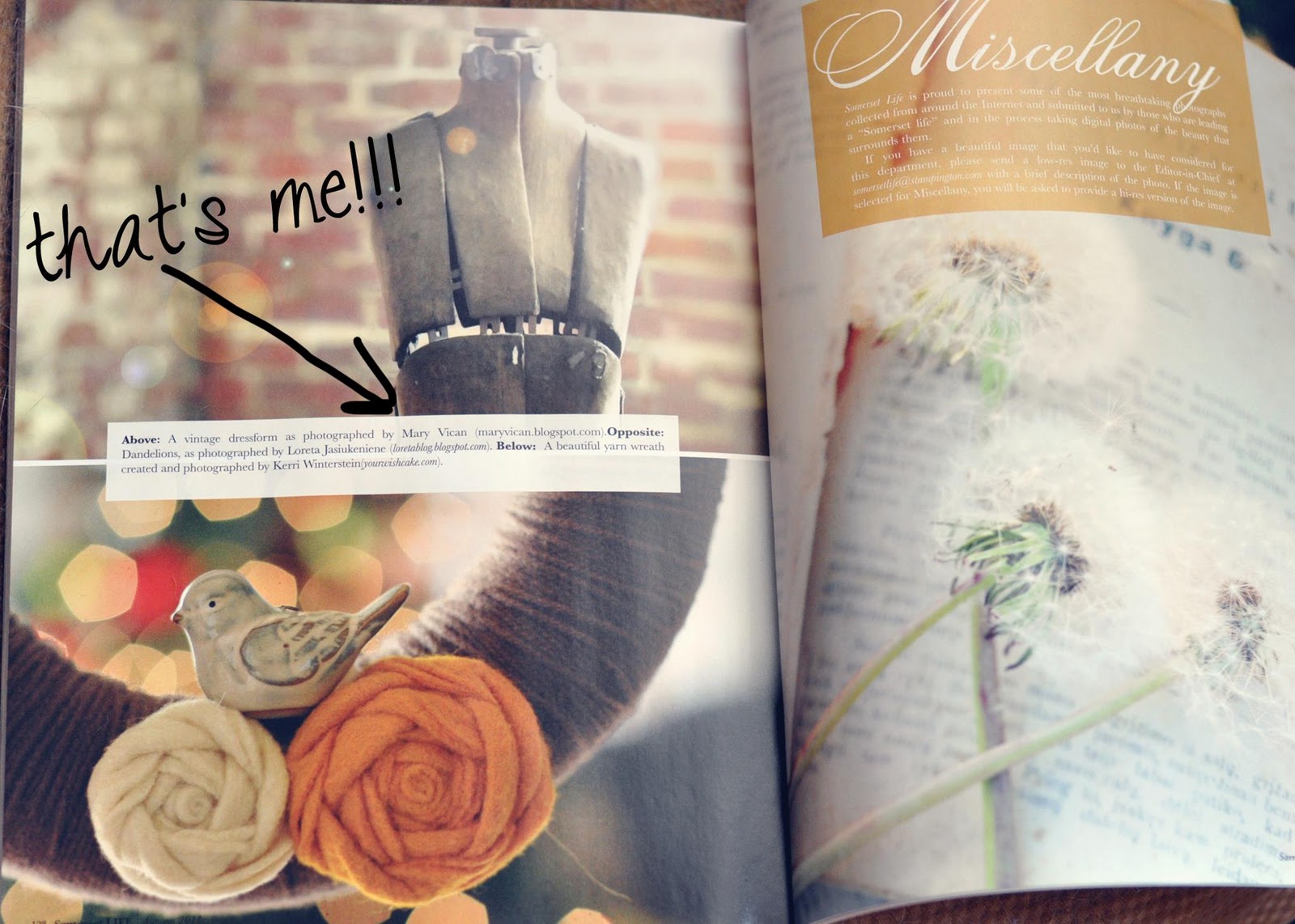
So, last week I was at the local bookstore, happily and caffeinatedly flipping through the latest issue of Somerset Life, when I did a double take near the end...Wait, isn't that my photograph? Yes! it is!  :)) (Big smiles and a dropped jaw in the bookstore didn't seem to faze anyone else, though. The cashier didn't really care either. sigh.) But here it is:


So that was exciting! If you're interested you can submit work to them, too- they are now accepting submissions for everything from photos to projects and jewelry and..well, check out their site above. Each issue lists items and ideas they're looking for in the back.  And finally..

Sunflower Field texture by Mary

Hunter's Beach texture by Mary

Two more free textures I made- feel free to download them here by opening in a new window in your browser or visit my flickr textures for more you can download. For the image at the top of my post I used some of the lighter brown textures mixed with bokeh, and then I used a hard brush in Photoshop with the brush tool to dodge out more bokeh around the top of the mums and bottom of the sign post.
happy Monday! :)

I looove Digital Textures! (examples + resources)

I've posted before about how much I really love using these digital textures in my photos. There are so many options you can use in Photoshop (or any editing program that allows the blending of multiple layers of work). I find a lot of my free resources on Flickr. If you're familiar with how Flickr works, you can search its Groups for "textures" and find some examples. Just make sure they are marked as free to use in your work. All of the examples here were made using those free texture resources except where noted. (you will need to have some knowledge of Photoshop layers to use the textures, but the links I provided below do give tips on this.)

Above is a simple photo I took last week of a dandelion weed. Although I really liked the negative space I thought this would be a great one to work with and texture. I added two textures- both on Darken blending mode at an opacity of between 40-50%. Then I went back and used the background eraser tool to lightly erase some of the texture over the detail of the floral so it would show through. Finally, I added the text, lowered the opacity so it blended better with the background, and moved it until I liked the composition.

This scene of a red-winged blackbird was kind of plain straight out of the camera. The sky was bright, but not especially interesting, and I thought the bare branches could handle some texture. I chose a light gray texture with long whitish streaks that looked like rain, erased away some of the texture around the center, and then added a slight vignetting around the edges. I also lightened the branches using the selective color tool so they would "pop" a little more.

Above, an ordinary photo of a flowering tree suddenly looks like a page from a vintage botanical book after adding a subtle texture. I lightened the leaves and flowers to the point where they had the same intensity as the background and didn't look too harsh.

Textures can also disguise parts of a photo that are otherwise distracting. This sign outside of a herb garden shop had a lot of charm but parts of it were discolored and rusty. I blended a simple, green canvas texture (purchased from Joy St. Claire, an extremely talented photographer from Ohio and great lady! you can see the textures she offers on her blog sidebar.)  I like the way it came out!

Ok, I have used this photo above before ( and it's in my current banner), but I find it magical. This was the night of the Supermoon, set against some beachy reeds and a lightened dusk sky. I added a subtle grungy texture for interest, blended it on low opacity, and then added randomly scattered text from a phrase I made up to go along with the image.

This is just a simple, kitschy sign atop a restaurant I noticed while shopping this winter. I used the selective color tool to brighten the red and white, then overlayed a misty, grungy blue texture with a soft vignette effect around the edges. It looks very sci-fi...doesn't it? I can't imagine this one without the texture now.

This macro photo of a simple acorn had a lot of pattern and interest, but I added this light brown "rough canvas" looking texture to give it even more. I played around with the blend modes until the acorn and texture just meshed together like one piece of art...now it almost looks like a different form of media.

I'm really still learning all of this, so I appreciate any feedback or tips anyone reading may have to share, too. I'll try to include them in a future post because I plan on playing around more with textures. I also have my own textures to offer you, which are free, mostly bokeh textures with circles of blur and light that add a magical, dreamy touch to photos. You can find them at the top of my blog, underneath the header on the Textures link.

resources:
Joy St. Claire textures, Moderne, Maggie texture sets
Grunge textures gallery
Textures for Layers - group in Flickr
Florabella's fine art textures set 

2010's Ten Most Interesting (according to flickr)..and Happy Birthday to me!

I will never understand (nor do they want me to) Flickr's "interestingness" calculations....I know it has to do with views, comments and such, but I also read somewhere it mattered who was commenting....I mean, isn't that odd? Like, are some comments more interesting than others? Anyway, for whatever reason these are my 10 "most interesting" on flickr for the year ending 2010...and my thoughts.

Ok, Phoebe is really cute and sometimes funny looking, but this was my first "Explored" image and must have also captured others' hearts. I loved that her whiskers were backlit and she looks a little crazy and intense, because she's normally a big fluffy mushball.

This was a digital texture I made using manual focus and combination of actions to produce the pale honey color. I like playing around with textures and use them myself, so I thought, I'll just create some and have them on hand.

Phoebe wormed her way into the limelight again with this funny holiday photo I took of her on my bed. I was untangling the lights and laid them down for a while in frustration, then found Phoebes snuggled up practically inside them. She got upset when I took them off her...hehe.

This is a real owl (I know he kind of looks like a stuffed animal, or a toy!) but he's a real Eastern Screech owl I was able to get really close up to during an owl show on Cape Cod in the early fall. I added the sparkly texture for the background because it was white and boring. I love the determined look on his face and the motion of the fluttery wings. I kind of wanted to take him home....

This is an older photo taken with an oooold camera that was grainy and a little dark, so I brightened it up by making the out of focus areas into little heart bokeh points of light. My fave part is the full moon which I turned into a heart also...Ok, I went a bit over the top, but flickrers liked it, and Shutter Sisters featured it on their blog. :)

This one above continues to get love on Flickr...when I took it, I was disappointed that the chairs were not real wood (they're plastic adirondacks- the horror!) so I tried to make them look real but I thought I failed at it. I just could not get them to look less plasticky. Maybe I'll be able to catch the same type of scene again with real chairs next year...

So this one I really love. Love the location, the colors, the light flare...:) And I was unsure I could really do anything with this photo at first because the day was fading away and the light was somewhat too bright because the tracks were flat and the sun was shining right where I was going to shoot the picture..and after this day I  began to experiment more with shooting towards the sun and liking the end result more and more.


This one, above was a re-edit. The original sky was too light and the sand was lacking detail. I went back and burned in some of the sand and sky, and selectively colored more of the cyan color in the sky until I had the result I wanted. I wanted a colorful, summery feel but not too warm that I lost the beautiful blues.

Another one of my faves, above, from a large county fair on Cape Cod last summer. It was super hot that day- like in the 90's or something- and I remember they were selling deep fried oreos (I took pictures of the entire frying process)...and I thought "Who would want to eat those today!!?" Due to the sweltering heat, the ferris wheel was the only thing I really wanted to do- at least I could get a nice breeze up there. Later this day I also had my photo taken holding a Barn Owl at the raptor show....the highlight of my day...:)

And finally, this dreamy scene from Florida....the beaches here (off Sarasota) are like powder and the sand sort of squeaks under your feet...much different than our rocky beaches up North. This roped piling I thought was like a little gateway to my very own private beach....since the beaches here aren't crowded, like they are in New England, where your towel is touching some other guy's and you get to listen to other people's radios and conversations. Nope, not here. Just the sound of the sea and seagulls, the way it should be. :)

Flickr Faves


The stillness of the autumn forest...the silent flight of the majestic barn owl.....late summer sunlight sparkles....emerald rolling hills from another land....a kiss captured.....a mother's memory.....simple joys of nature....childhood remembered......the dance of the penguins

1. Autumn Road, 2. barn owl, 3. Delicate, 4. Untitled, 5. Just breathe..., 6. Deep Within, 7. Bee dreams, 8. where do we go from here?, 9. acrobats

TTV Texture used for Layering - First Attempts

Ok, so I'm learning to work with Photoshop to take advantage of some of the awesome free textures available on Flickr. I picked some files of varying quality and genre, and sat down to learn how to do it. I had used layers before but not used textures and not with my own photos. So, here are the results. All textures are the same: "dirt ttv 1038", courtesy of the talented Nesster.

This is a photo of a tropical bird which was immortalized at the Denison Pequotsepos Nature center in Mystic, CT. I had some shadows behind the bird, which did not look quite right, plus the whitish, blank background I thought would work well with TTV. I like it, but I'd like it more with a sky ttv background.

 
This is another piece I shot at the nature center, of a butterfly under glass. It's supposed to look distorted and old, so the texture works really nicely here, I think. I used the "darken" feature in the layer tool to bring through the color of the butterfly a bit more, since playing with the opacity under "normal" didn't do it justice.
This is an older file taken with a 6 megapixel digital point and shoot. It's of the San Francisco skyline under fog and behind clouds. It's poor quality, so I really played around with it, giving the clouds above a colored, hdr-effect, and then applying Nesster's texture. I like using landscape with this texture because it's believable that someone see this far away scene through a dirty and smeary lens. Or maybe that's just me. I like how the detail-less, one color skyline matches the ttv frame.

 
I reeeally love this one, although I took it as a screen shot- from a television commercial. I was testing my  Nikon d90 at the time, trying to see what kind of quality shot it would take from the tv, and playing with the automatic settings. I ended up liking it, so I kept it and used it here. I love the way the texture really matches the scene, I can imagine capturing a quiet moment like this with an old toy camera. Plus, the texture hides the screen shot's effects of electronic noise and strange color aberrations, so it comes out looking more like a normal photo. I imagine this is something my cats would do.....if I had a piano in my condo. 
I hope to try more work with textures this week, they're incredibly fun, and are helping me learn some of the features of Photoshop I wasn't using before. As I improve and learn what works, I may post some of them on Etsy as well.

Starting the Weekend Early!


Surfboard Fence
Originally uploaded by maryvican

I'm off to Southern Rhode Island to see what I can see, just me and my camera. No schedule, no rules, no self-criticism, ...Happy Weekend!

Affordable Art with Real Meaning

There are countless websites, home decorating magazines, and home stores hawking overpriced artwork. Pieces that were inspired and took hours of work and thought and planning don't have the same appeal to me once they're ubiquitously found in every cookie-cutter home catalog. Worse, much of the artwork I see at home decor chain stores is badly framed, sometimes not matted, or matted with unflattering colors. It takes a very unique eye and your own personal touch to create a piece that's going to coordinate with your house and the feelings you want to evoke. Lastly, who wants to have the same dull art as everyone else within a 3-mile radius?

 I love trolling through Etsy to find original, incredibly unique and really, really outrageous stuff. And at the end of the day, I'm able to purchase most of what I like for myself, because the artists and crafters I follow have fair pricing and a wonderful product. I've purchased several prints now from fellow fPOE team members, and opening their work and seeing it in my home is so rewarding- I feel a real connection with both the artists and the work. And I feel like it's special because I had a communication directly with the artist, conversations, emails, and signature on my piece. How many people who shop at chain stores and mega marts can say that about their artwork?


Art and photography is emotional, it can be life changing, it can open your eyes and change your point of view. And it should be something that everyone can afford. From a buyer's point of view, saving money is important. I want to be able to offer original works of art that don't cost ridiculous amounts of money, but whose prices reflect my efforts, and those of my fellow photographers. Efforts which include: the time, research and shopping, cost of software, cameras, equipment, computers, ink, photo paper, custom orders, shipping, packaging materials, labels, tuition, and for many artists, heart and soul.


For all of those variables, I believe my prices- starting at $5- are incredibly affordable and fair. I love that someone would take the time to look at something and have it speak to them in a way that they MUST own it! The feeling I have when someone purchases from me is incredible. I encourage everyone I know to create, create, create and put yourself out there and see what happens. Sometimes, I feel exposed and vulnerable, what with my full name on my Blog, my Etsy, and my Flickr- and my ramblings and photos for all the world to see! But it's amazing on so many levels.

PS....all the work above is available on my shop and super affordable!


Happy Day!